From a Distance

Steve Jobs
Steve Jobs
Steve Jobs is dead. Apparently he passed away sometime this morning, and it seems obvious that his death is a result of his recent and prolonged battle against pancreatic cancer.

I first learned of his passing on my iPhone, and confirmed that the report was more than rumor on my iMac. I suppose this is as fitting a legacy as any for the man who changed the modern world. If I say that my life has been irrevocably changed because of Steve Jobs, I am not exaggerating or being sensationalist. The first computer I ever bought was an iBook (the laptop) back when I was 16. The first digital media player I ever bought was an iPod, classic Jobsian hardware. My first purchased desktop was an iMac, the great grand computer of Jobs’ Apple Computer saving computer. The first, and only, cell phone I have ever owned was an iPhone. I watch TV via my TV.

All my life I have been immersed in new technology, hardly surprising for a kid who grew up in the 90s. Most of my life has been shaped directly by Apple products. It should come as no surprise, then, that Steve Jobs’ death is hitting me harder than even I realized that it would.

I have been sitting here tonight, reading tributes to Steve on Twitter and FaceBook, and trying to figure out why I am on the verge of tears. Steve Jobs was a business man. He made products and sold them and made billions of dollars doing it. If the founder of Nike or McDonalds died tomorrow, I doubt I would give it much thought. It would be a footnote to my day. So why is Jobs’ death affecting me so much? Probably because Jobs did so much more than just make and sell a product. He has changed life itself.

I watched the keynote address from yesterday’s iPhone 4S product launch, and something Phil Schiller said is replaying itself in my brain: “we created the iPod because we love music”. Steve Jobs helped to create the digital music player because he liked music. Sure, the money he could make selling it must have been in the mix somewhere, but I really don’t have a problem believing that Steve’s primary motivation wasn’t the money, but the music. In all the keynotes I have ever heard Jobs give, one thing always seemed to be at the forefront of his presentation: enjoying life. Sure, he talked about how Apple was doing, and how many products they had sold, but always the emphasis seemed to be on the lives of the people using the products, and not on Apple’s bottom line. Jobs’ eyes sparkled when he talked about living at the intersection of technology and the liberal arts. He got choked up after demonstrating how his innovative FaceTime allowed people to talk face to face. He was like a giddy kid when he announced that he had brought the entire Beetles catalogue to iTunes, and not from the greed of pennies filling his bank account, but from finally being able to bring some of his favorite music to millions of people in a format that would allow some of the most popular music of all time to be preserved for hundreds of years to come.

I don’t know if this is true, but I’ve heard that Jobs’ annual salary from Apple is only $1. Not that he didn’t benefit from his company’s success, he surely did, but what was important to him was designing the world of tomorrow, and in creating new ways to enjoy the things that make life worth living: family, creation, and innovation.

I think because I was 16, in the prime of designing my life, when I first started to adopt Apple products, that I also started to design my life around Apple’s, and Jobs’, philosophy: think different. Create. Stand out from the crowd. Live life. My life has become a life in which I immerse myself in my creative endeavors because I find them stimulating. I think that is all Steve Jobs ever really did.

This man I never knew changed the world I live in. Steve Jobs changed my life.

I will miss him.

Twitter has been full of some awesome quotes from Steve Jobs. These resonate most with me:

“Your time is limited, so don’t waste it living someone else’s life.”

“We don’t get a chance to do that many things, and every one should be really excellent. Because this is our life.”

“Remembering that you are going to die is the best way I know to avoid the trap of thinking you have something to lose. You are already naked. There is no reason not to follow your heart.”
Casing the Joint

Ever since I bought my iPhone 4 (a little over a month ago) I have been searching for the perfect case in which to enclose it. My first attempt was a failure, and my second, despite being the paragon of nerd construction, was only slightly better. It took an act of chance to give me a case that I absolutely love.

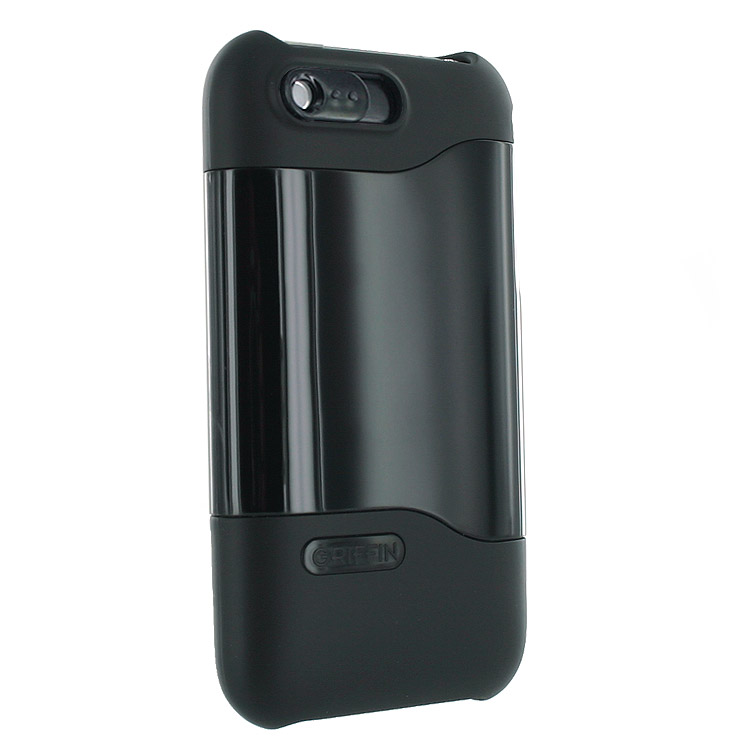
My iPhone 3G was housed inside of a Griffin Clarifi.

Griffin Clarifi
Griffin Clarifi
It was a terrific case, made in two parts, that ruggedly secured my phone for over two years. Showing definite genius, the Clarifi also had a lens that could slide in front of the iPhone’s camera, yielding a degree of focus for up close picture taking that was not available otherwise. Unfortunately, when Apple redesigned the iPhone into something sleeker and more beautiful, the old case no longer fit (and the focusing lens was unnecessary). I purchased the case via ThinkGeek, but it was designed by the craftsmen over at Griffin Technology, a top of the line manufacturer of Apple accessories. I have a dual iPod/iPhone dock made by them, and if ever I was going to have the money to afford some really cool Apple compatible gadgets, Griffin is one place I would look. So, I naturally looked there first for a new iPhone case.

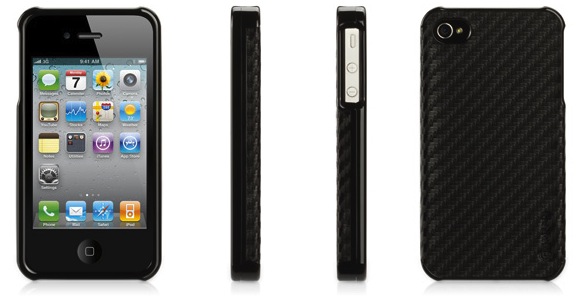
I really wanted a two part case, like the old one I had, and one that I thought would fit the bill was Griffin’s Elan Form in Graphite.

Elan Form
Elan Form
It really looks great, but that isn’t enough. The case itself is somewhat flimsy, and is designed with front and back sides that are supposed to snap together around the iPhone, but I discovered that the two sides parted company at the slightest opportunity after just a few days of use. If I were a business executive or someone a bit more high class that carried my iPhone around in my suit pocket or attache case or whatever, the Elan Form would be stylish and more than adequate, but my preferred method of iPhone transportation is the carpenter pocket on my blue jeans, and I need something a bit more rugged.

Purely by accident, I came across a review for a case designed by a brand new company called Small Works who dreamed up an iPhone case that is pure geek win.

Brick Case
Brick Case
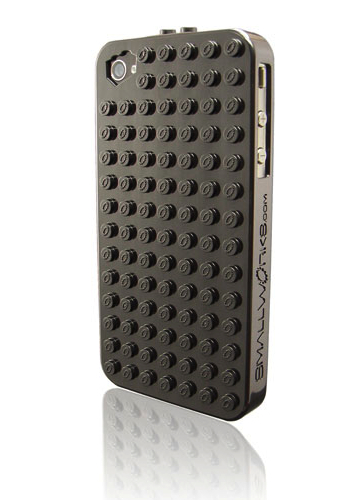
The Brick Case is for the Lego lover. Overcoming multiple design and manufacturing obstacles, Small Works was able to fashion a case that resembles an iPhone-shaped Lego brick. The studs on the back conform exactly to Lego standards, meaning that any existing Lego bricks will snap onto the case, yielding endless decorative possibilities. I absolutely love the hard, rugged plastic that Small Works used for their case, and as an ardent Lego lover, the case is practically an embodiment of the nerd slogan For the Win! I do, however, have one complaint with the Brick Case: it is very rigid, meaning that the iPhone snaps into the case and never moves, but extraction from the case can be an arduous task. Nevertheless, I think I will keep the Brick Case for times when I need to have the iPhone in a case for a long period of time.

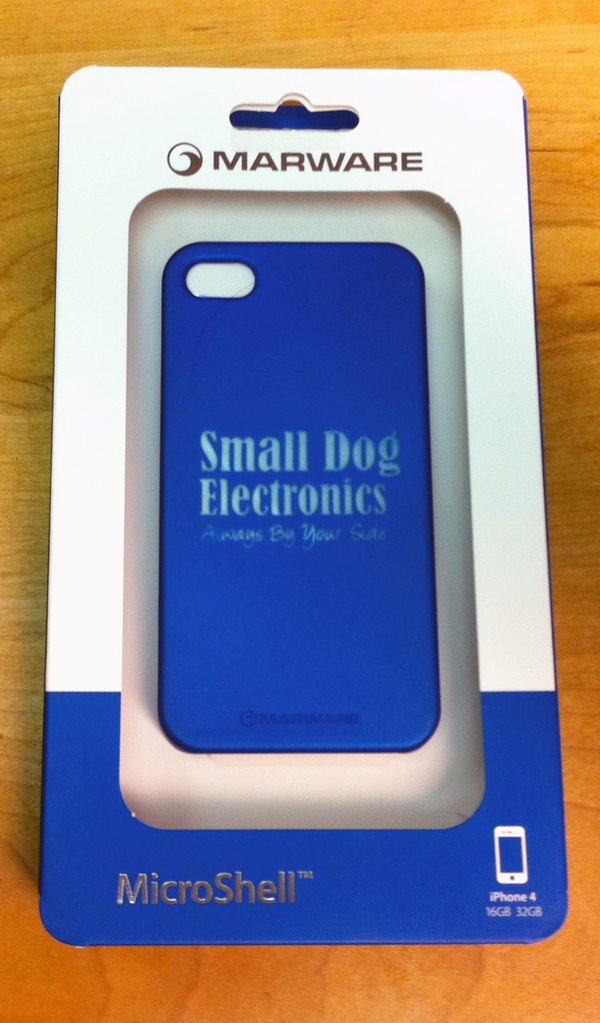
My modus operandi with my iPhone is to have it au natural when around the house. Apple’s design is too stunning to cover when the device doesn’t need protecting. Even when using the iPhone to take pictures, or control my  TV, I find myself examining the design with wonder. (I don’t mean to gush, but I do think the iPhone 4 is one of the pinnacles of Apple engineering.) That being said, I want a case that offers protection when out and about, but that is also easily removable. Enter the dues ex machina of this story: Small Dog Electronics. Small Dog is an Apple Specialist company headquartered in Vermont that is the epitome of small, local business (sadly, their only physical store outside of VT is in New Hampshire, but I would be happy to work in their first Wisconsin location). Their employees are friendly, helpful, and awesome. And, they are the only company that I know of that is crazy about their dogs. Seriously, there is an entire section of their website devoted to the dogs they love. I love Apple and I love dogs, and the intersection of those two is Small Dog. I had the opportunity to shop in their South Burlington store when I was attending college in up state New York in 2006 and I have been a fan of their company ever since. The long and short of this story is that a few days ago, while following Small Dog’s twitter account (@hellosmalldog), I noticed that they tweeted a contest whereby one could win one of ten iPhone 4 cases. (The other part of this story is that I have never, in my life, won any sort of raffle or contest. Ever.) The contest required a re-tweet and I figured that, even if I didn’t win, I didn’t mind giving Small Dog a little free publicity, so I re-tweeted. To my shock, the next day I got an email from Small Dog telling me that I won. I gave them my address, and yesterday I received my prize: a Marware MicroShell.

Small Dog Marware
Small Dog Marware

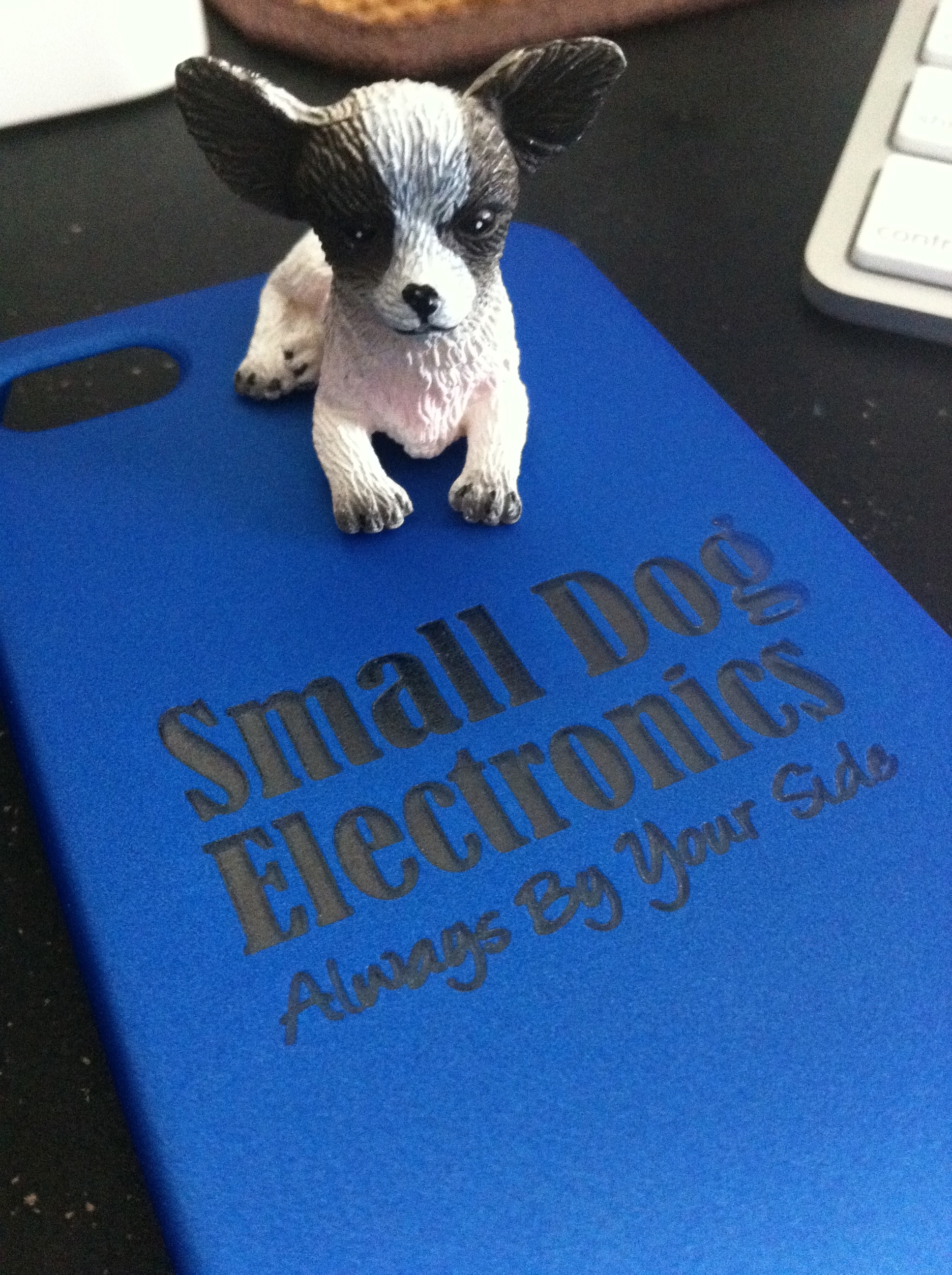
The MicroShell is the perfect blend of function and protection, offering a hard plastic shell that also flexes, allowing for easy removal of the iPhone. The case is a smooth, soft feeling plastic, cool blue color, and showcases the etched logo for Small Dog. In short: I love it. (Thanks, Small Dog!)

Added Bonus: Included in the box from Small Dog were two “small dogs” that are part of a collectible set, all species owned by Small Dog employees. In lieu of a dog of my own, they sit just beneath my iMac and keep me company.

Small Dog
Small Dog
Small Dog 2
Small Dog 2

App: Instagram

I am an amateur photographer.

Until recently I was considering buying a point-and-shoot compact digital camera, something like a Canon Powershot or similar variety, but, after upgrading to an iPhone 4, I’ve changed my mind.

I had an iPhone 3G for over two years, and while the phone had a camera, it wasn’t the best and didn’t take exceptional photos. It snapped grainy, low resolutions pictures like most other camera phones. The iPhone 4 takes much better pictures with its upgraded camera which boasts higher resolution, increased megapixels and LED flash.

Quality is certainly a factor in a camera purchase, but a secondary consideration I had was pocket space. I don’t carry a man purse, messenger bag, or any other such device for hauling stuff around with me. My every day inventory is limited to what I can hold in my pockets. Currently that is a wallet, a moleskin notebook, a pen, a pocket knife, my keys, my iPhone, and on days that are sunny, my sunglasses. I don’t have an extra pocket for a camera, and even if I did, many small cameras are still bulkier than I want to shove into a pocket.

My last concern was ease of use, and while this isn’t a problem with actual cameras (power on-point-shoot-repeat), it was with the iPhone. My 3G was feeling its age, and barely was able to run the iOS 4 software and that made taking pictures painful. I would have my nieces over, and one of them would do something cute, and I would want to capture it, but by the time I whipped out my iPhone, unlocked it, activated the app, and waited for it to ready the camera, my ever-in-motion niece would no longer be in the same place doing the same adorable thing. To my satisfaction the super-speedy upgraded hardware that inhabits the iPhone 4 activates the camera app as quickly as my fingers can manipulate the touchscreen and I am ready to take a photo in seconds.

Having decided to make my iPhone my camera, I looked into apps that would further facilitate my creative impulses. There are a plethora of photo taking apps available in Apple’s app store, and if you’ve an iPhone or iPod Touch, I recommend having a look around. My go-to app, thus far, is Instagram.

Instagram
Instagram
The app allows me to take a picture, apply one of several filters to alter the look of the photo, and then post the photo to Facebook, Twitter, Flickr! and other popular social networking web sites. Instagram is so easy to use that, once I have decided what to take a picture of, I can snap a picture, choose a filter, give it a title and a geolocation tag, and upload it to the world wide web all in about 45 seconds. Even better? The app is Free.

I like Instagram so much that I have decided to challenge myself to take one picture with it every day for an entire year. So far I have taken 11 consecutive photos which you can see here. I plan to peruse the App store and try out other photography apps, and when I do, I will post reviews of the ones I like and choose to use.

Photography is a huge field, but what I really appreciate is the breadth of opportunity within it. There are high end, expensive, well-crafted cameras for the expert photographers and there are ordinary, cheap, well-crafted cameras for the amateur photographer. For my simple purposes, there is an iPhone with an app for that.

Update: Aluminium

Aluminium
Aluminium

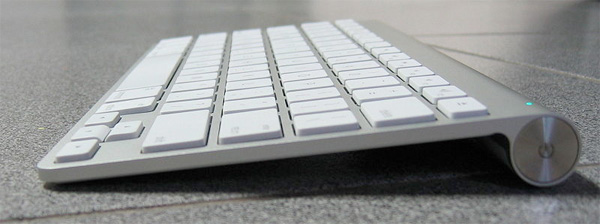
I own an Apple iMac, a most sexy computing machine, which came with a most sexy input device: a bluetooth keyboard. I happily used this wireless keyboard for most of the year and half I have owned this particular iMac. The keyboard is impossibly small, lightweight, and spectacularly easy to use. The latter point was most surprising to me as the first two were readily evident, but I thought that having something so small and compact would make it harder to type on. Quite the opposite, in fact. While I grew up on massive beige PC desktop computers with their massive beige PC keyboards, for the past few years I had been using either an iBook or a Macbook laptop, and Apple has been making their laptop keyboards smaller and more compact in the endless pursuit of the perfect portable computing machine. The end result was that I was becoming more and more accustomed, without realizing it, to a smaller keyboard. In actual fact, the Apple aluminium wireless keyboard is really about the same size as a Macbook keyboard. Therefore, when I received one with my new iMac, typing with it was as natural as ever.

Wireless
Wireless

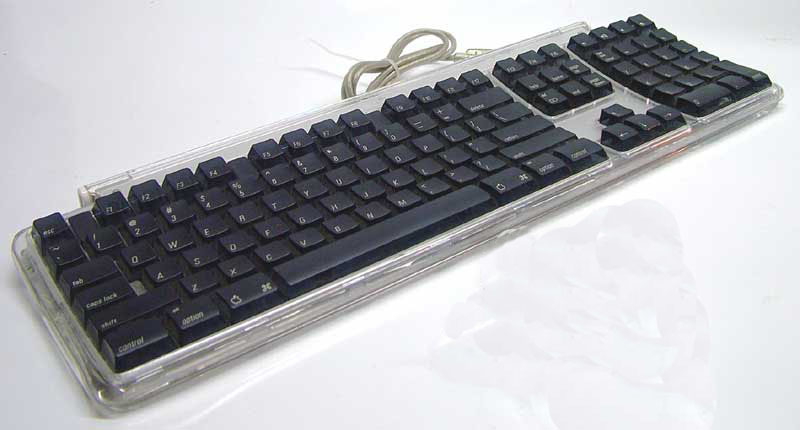
A few months ago, however, I had become somewhat nostalgic for a full size keyboard, that is, one that contained a numeric keypad and larger arrow keys. I had a full size Apple keyboard lying around, and when I say full size, I mean full. I had picked up an old iMac keyboard on eBay a few years back as a backup in case all my batteries went dead, or I spilled something, or for whatever reason I needed a keyboard that would plug in and work. But the massive input device was easily three or four times the size of the sleek bluetooth model and more than usually clunky.

Ye Olde Keyboard
Ye Olde Keyboard

All this talk of size, and sexiness, aside, the worst problem that I had with the old keyboard was that the keys were so large, and so spread out, that I continually hit the wrong key. A long time ago when I was just a young lad and Windows 95 was brand new, I typed in much the same way that a woodpecker pecks: tap – tap- tap (except that woodpeckers are usually faster). I hunted endlessly for the right key and then punched it down with a determined finger. Eventually, though, I took a short typing class in school, wherein I learned “correct” procedure, and straightaway I began typing faster with much fewer mistakes. Now, of course, like most people my age, typing is second nature. I never really look at the keyboard anymore, my fingers just fly across it and I magically hit the exact key that I intend to type almost every time. Sometimes I still find this amazing, given the number of keys on the keyboard and their completely unalphabetical layout. (I mean, who was this QWERTY person anyway?)

So given the fact that spend most of my time on the computer typing away, writing one sort of thing or another, the ability to type quickly and accurately is a necessity, and the large old keyboard simply couldn’t help me. The other problem I had was that I am mostly an insomniac and my writing is largely a nocturnal activity. I tend to only use the minimum amount of electricity, and so didn’t bathe in an overabundance of light. The aluminium keyboard, with its white keys and silvery reflective body, never gave me cause to have a problem. The iMac screen emitted enough light to see by for those few occasions when I actually needed to look at the keyboard; however, the older keyboard had black keys, and seeing as how I frequently missed the one I meant to hit while typing, I couldn’t even see the keys to find the correct one. I was reduced to using a USB lamp plugged into the convenient USB port on the left end of the keyboard just to make sure I was typing accurately.

Sure, most of these problems were the result of poor lighting and a dark keyboard, no doubt solved with proper illumination and a whiter keyboard, but the fact is, as soon as I retrieved my wireless keyboard and set it back up, I was typing much quicker and more accurately from the get go. There quite simply isn’t any comparison between the old and the new.

Now, if only there were a way to have my numeric keypad as well.

Turns out: there is.

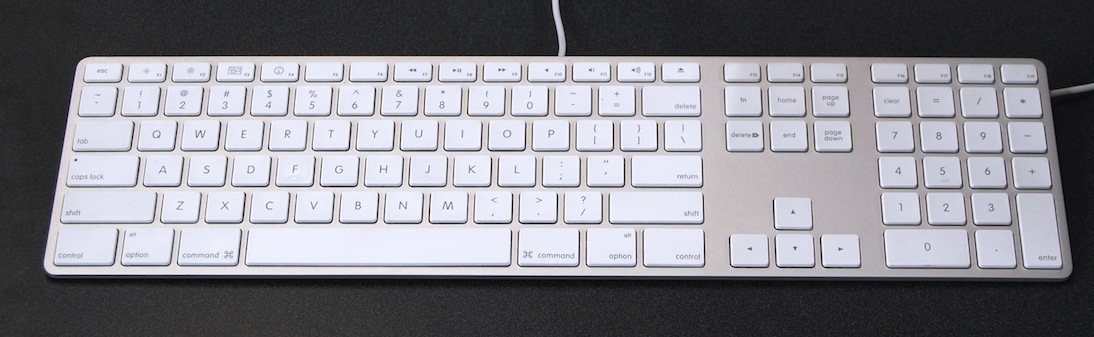
Wired Aluminium
Wired Aluminium

I have since sold my wireless keyboard and purchased the Apple aluminium wired keyboard with numeric keypad. Much slimmer and sexier than ye olde keyboard, and the keys are compact like the wireless version. I love it so very much!

A Tale of Two Batteries

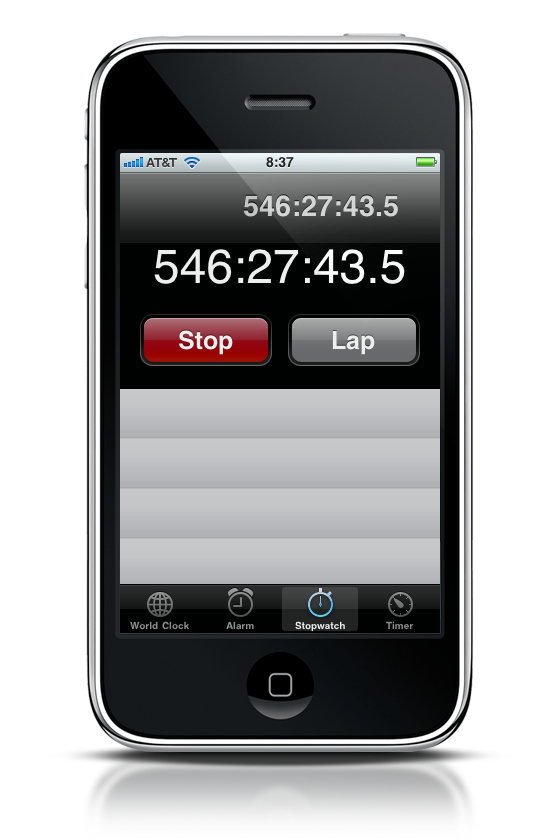
About 22.8 days ago I started an experiment to see how long my Apple branded AA batteries would last when powering my Apple branded Magic Mouse. I did this more out of curiosity than anything else. My test parameters were as follows: I inserted two fully charged (according to the Apple battery charger) AA  batteries into my Magic Mouse. I started up the Clock app on my iPhone. I turned on the Magic Mouse. As soon as my iMac paired with the Magic Mouse via bluetooth, I started the timer on my iPhone. I then left the mouse on and left the timer running. I waited until my Magic Mouse lost bluetooth connection with my iMac and stopped the timer. This is what I saw:

Apple battery time test 1
Apple Battery Time Test

546 hours, 27 minutes, 43 seconds – and so on. It might not be precise down to the tenth of a second, or even the second, but I think that it is accurate enough for my purposes. I now know how long, approximately, a pair of  branded AA batteries lasts in my Magic Mouse. But, I grew up doing science projects in middle and high school where I was graded on my ability to design, run, and conclude rigorous experiments. One test is hardly a conclusive pseudoscientific experiment.

Well, as it so happens, I have two other  AA batteries, and I have started a second test along the exact same parameters as the first. I will perform 10 tests with each set of batteries and then can cull a more exact approximation of their time before depletion. Then, to be fair, I will test two sets of two AA batteries from two leading brands (probably Duracell and Energizer) as controls to which I can compare my results.

Sounds like months of scientific fun!

You can read my original post about the batteries here.

Kindle Edition

Last night I was over at my brother’s house helping him unload a brand new snow blower. Given the way the fluffy white flakes have been falling all day today, I bet he is glad to have bought it. After our work was done, we retreated into the warmth of his house where my wife played with his daughter, and Joe showed me his other special child: his newest Kindle. Yeah, this one: Kindle 3.

For comparison, he handed me his Kindle 2. I perused a book on both while he enumerated the features and we argued about whether it was better to sell his old Kindle on eBay or Craigslist. (As a frequent eBay seller, I supported the online marketplace. He preferred the down home local feel of Craigslist.) As I held the Kindle in my hands, I admit that I was very impressed with the craftsmanship and the texture of the device. The text was clear and easy to read; the font lines were crisp and unblurred. The “pages” turned quickly, and the device was light in the hand.

I own a 3G iPad, a device I use constantly and value highly. The first thing I thought when my brother placed his new Kindle in my hands was that I couldn’t see the text. There was only dim lighting in the room (mostly his Christmas tree) and the Kindle has no backlight. Being used to my brilliant iPad display, I was immediately frustrated to not be able to see the screen in low light. Next, a message of some sort appeared on the screen, and I instinctively reached up to touch the “x” in the upper corner of the message to make it disappear, before belated remembering that the Kindle is not a touch screen device, and my brother pointed to the rather obvious keys put beneath the display for such purposes as typing and selecting. But, once a light was turned on near to me, and after Joe helpfully produced his little Kindle reading lamp, I could see everything just fine.

Despite being an admitted Apple fanboy and an iPad lover, I see obvious and distinct advantages to owning a Kindle. It is an excellent device, especially the 3G version. The 3G is free, and useable world-wide. I once used the 3G connection on my iPhone in Italy while on vacation (mostly the Maps app to navigate the incredibly confusing Venice streets) and incurred a hefty data fee while browsing the local cellular data network. So, the free world-wide 3G connection is definitely a bonus. But, even my unfortunate incurring of a large bill shows why the iPad is superior to the Kindle: my brother can only read on his Kindle. He can’t find his way back to Grand Canal when lost in Venice. I can watch movies, view photos, surf the web, type this blog post, look up recipes, play games, tweet, mail, and a thousand other things on my iPad. And I can do it in full color. Even reading books, I can see illustrations in full color. The Kindle is only black and white.

If reading were all one wanted to do, I could understand owning a Kindle over an iPad (for one thing, the cost of a Kindle is a fourth of the iPad’s price tag) but I can’t see opting for Amazon’s Kindle in a world were very few only want to read on a mobile device. In order to afford my iPad, I sold a Macbook that was barely 2 years old, a decision I have not once regretted. I can do everything I ever did on my Macbook on my iPad (and some things I couldn’t), and without the weight, heat, and shorter battery life. As for reading digitally, given the current status of the eBook market (small selection, and relatively high pricing) eReading simply isn’t that feasible right now. I have whole shelves of books that I love to read that I cannot download in the iBookstore, Kindle store, Nook store, or any other digital book store, and haven’t the time or patience to locate in decently pirated iteration. My number one most looked forward to app on the iPad was indeed the iBooks app, but after seven and a half months, I barely read on my iPad. If I had purchased a Kindle, I fear the money would have been wasted. The overwhelming amount of apps available for the iPad make it a much more valuable device. As is already cliche to say: there is an App for that. If you want to do it, chances are you can download an app that let’s you. Usually you have more than one option.

I can control my entire media library with the touch of a finger, push it onto my HDTV via my TV, browse my iMac for content, and do anything else that I routinely do in cyberspace, all with a device that I can hold with one hand. None of that is possible with a Kindle, and I believe that in a world where more people are doing more things with digital devices, an electronic book reader will be swallowed up by devices that allow their users to read — and everything else. I find this disappointing to say, mostly because the newest Kindle is so well designed, but a great design, if unneeded, is ultimately a useless design.

But, even the most versatile of devices, such as the iPad, is overkill if all one wants to do is curl up and read digitally. And the Kindle allows anyone to do just that — with elegance.

reCharging the Batteries

I met the most conscientious UPS employee today. He tried to read my signature and couldn’t and asked me twice if I was, in fact, Philip Martin. I confirmed his suspicions on both occasions and felt a warm glow caress my heart. Seriously, I was pleased, because a few days ago I embarked on a trip to the post office to mail a picture to my Aunt, swiped my credit card to pay for the charges, and was told by the postal employee that because my total was under $25 I did not have to sign for the purchase. That made me go all cold inside, knowing that anybody could steal my card and pay for postage, or a soda, or a pack of bubblegum without signing. (I wonder why Wal·Mart makes me sign? Is the under-$25 a USPS only sort of thing?)

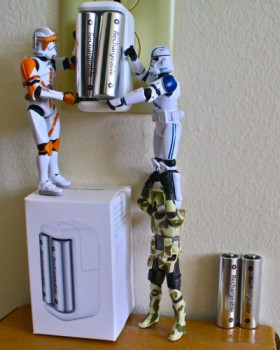
Anyway, I finally retrieved my small, brown box from the large, brown attired man and sat at my desk gleefully. Well, more pleased, I suppose. Slicing the packing tape carefully with my amber-studded Lithuanian bought switchblade pocket-knife I unpacked my brand new Apple manufactured rechargeable batteries and recharging module. This is a recent hardware release from the computer-phone-media-pureawesomeness company, designed specifically to power their line of bluetooth hardware: the Magic Mouse, the Magic Trackpad, and the keyboard (my dark brooding sense of brooding wonders why my keyboard is not magical…is it conspiracy? like the magical call-dropping iPhone 4? of course not. There is nothing magical about a device that has been around for over 30 years.)

I immediately admired the small, efficient size of the charger. It is barely bigger than (two of) the batteries themselves. The plug, like most of Apple’s wall plugs, is interchangeable, allowing for the easy adaptation to any power point size and configuration in the world (in conjunction with Apple’s World Travel Adaptor kit). This point particularly pleased me as I am a frequent world traveler, and like to keep all my lovely Apple gadgets powered on the go. At first glimpse, the batteries appear industrial. No copper-top, no lightning bolt; actually the battery is entirely silver, with only the word “rechargeable” clearly visible between a giant + and – sign at the appropriate terminals. A closer examination reveals that these are NiMH batteries, and were made in Japan (not China? that’s different). But I like that Apple chose not to waste any frivolities on the design of something you only only rarely see. The charger came with a total of six batteries, two for a mouse, two for a keyboard, and two always charged for quick swapping. (Here, Apple fails me, because I have an older bluetooth keyboard which takes three batteries, not two. I have yet to resolve this dilemma. I might sell my keyboard and buy a newer one, because one charged battery doesn’t do me a whole lot of good when I need two.)

Battery Troopers
Battery Troopers

Currently I have two batteries charging, and the other four wait impatiently for their alternating current feeding frenzy. Apple says that these batteries should knock all others out of the park, and I am genuinely curious to see how long they really last on a single charge. I sincerely hope it is longer than my old Energizer rechargeable batteries which died at the first sign of serious use. And by serious use, I mean turning on my camera. All in all, I hope to save money on battery buying and save energy with green batteries.

(They are actually silver, but you get my point.)

(Not So) Special Features: On iTunes Extras

Recently Apple added a new feature to the iTunes movie store: iTunes Extras. Certain movies (mostly new releases) on the iTunes store now include Extras, or what are commonly known in DVD circles as Special Features.

I was intrigued by this newness in the iTunes store, and was curious about the comprehensive nature of the Extras, but haven’t had a reason to try it out until yesterday. I am a massive film nut, and watch all the special features I can, usually springing for the $20 2-disc DVD set at Wal·Mart just to get a whole extra DVD of featurettes, interviews, and FX breakdowns. But, I also like to have the digital copy on my computer, which usually means a complicated process involving Mac the Ripper and Handbrake.

iTunes Extras seemed it could be the perfect solution for me and I decided to give it a whirl. GI Joe: Rise of Cobra was recently released, and I saw the movie in theaters, and was reasonably entertained, and put the movie on my short list to buy, and yesterday bought it for the new release price of $14.99 from iTunes. I accepted this price because it is about the same as the 1-disc from Wal·Mart which usually don’t come with many Special Features, so if this was a digital edition + extras, it seemed like a good deal.

It wasn’t, really.

After buying, and waiting for the download, not only do you have a digital copy of the movie, but you also have a secondary file called “Extras”. When you click on it, a menu comes up that looks very much like a DVD menu, but inside of iTunes. This then has a “Play Movie” button, a “Special Features” button, and a few others. But, what was disappointing was there were only 5 or 6 special features, and of those, only one was longer than a minute (it was 6 minutes). Two even seemed to simply be scenes from the movie, but without the soundtrack. The only interviews were with the Special Effects director, and a few blurbs from the principal actors. The only really interesting feature was a whirlwind history of GI Joe from a Hasbro executive.

Now, I am willing to chalk this up to GI Joe not having good special features, but I just can’t make that fly. Having already spent money on the movie I am not willing to buy the DVD and find out, but I have been watching Special Features for very many years and I haven’t seen a DVD that doesn’t have at least a 15 minute “Making Of” and a few shorts on key action scenes in about 8 years. Most of the good ones even have “Behind the Scenes” on soundtrack, sound editing, lighting, or other parts of the filmmaking process. GI Joe actually lacking on special features just doesn’t make sense. What I want to see is the process of filming, the journey undergone to bring the story to the big screen. This is all lacking in the iTunes Extras.

I am willing to give Apple the benefit of the doubt, and say that as the idea is a new, it is therefore underwhelming, but my analysis at this junction is that it is not worth it. I really want this to get off the ground, and want to see as many special features available to download as on a DVD, but I think I may be waiting a while longer for this to come to fruition, if it ever does.

Not Some Conjurer of Cheap Tricks

Well, I have, and have been using, my brand new Apple Magic Mouse. I won’t attempt to explain the inner workings, but it is really really cool.

To afford it I sold my second brand new (formerly known as) Mighty Mouse on Ebay. I say second because this is the second replacement Mighty Mouse that I have acquired from Apple, courtesy of my iMac’s Apple Care.

While the Mighty Mouse was a technological wonder when it arrived on the computing scene, it contained a hold-over from previous generations: the scroll ball. Instead of a scroll wheel that went up, and then down, the scroll ball was capable of 360° movement. This seemed like a new idea on a mouse, but really, it was a very old idea. Before some genius applied laser tracking to mice, they literally rolled around on a ball. All Apple did was put the ball on top of the mouse, and use it for scrolling. Honestly, I don’t know why no one thought of that before, or tried to market it. However, back to my replacement mice, the ball-on-top was prone to the same problem as the ball-underneath: gumming. Rolling the ball around on your desk, or even mousepad, invited the ball to pick up dust, dirt, grime, and whatever hangs around on your computer station. Rolling your fingers around the scroll ball on the Mighty Mouse had the same effect. The only difference is those old mice used to be really easy to clean. The scroll ball on the bottom was very easy to remove, clean, and replace. The scroll ball on the top was completely integrated into the casing of the mouse, and only by literally breaking it open could you clean it. So, I had not one, but two Mighty Mice replaced because eventually the ball would quit sensing the scrolling I was trying to do.

I wanted for some time to replace my latest gummed-up Mighty Mouse, but had been hearing rumors of a new mouse from Apple, and so waited. Sure enough, the Magic Mouse was released a few weeks ago. I immediately called Apple Care, and negotiated for a new mouse. Secretly I hoped that they would note that I had a wireless Mighty and out of the goodness of their hearts upgrade me to a Magic (all Magic Mice are wireless) but alas, they must have a few old Mightys in storage. However, my good friend the global garage sale came to my aid, and some dude in Manhattan bought my Mighty.

Thus in the need for a mouse, I went to the Apple Store and ordered a Magic Mouse. It arrived a few days later. After the obligatory install of new software and a reboot, I was up and running, or should I say, gliding. The Magic Mouse glides. Having used a variety of mice in my technological career, this is the smoothest mouse I have ever used. It sits on two parallel runners on the bottom of the mouse, and however they are designed, they make the mouse fairly float across my pad. Add to this a decent amount of weight built into the mouse (the Mighty Mouse felt a lot lighter) and the movement is the best you could hope for. Also, they say that the laser sensor is among the best ever designed and at least to my mind, the pointing seems more precise, but this could just be my imagination.

The mouse is precisely symmetrical (or would be except for the Apple icon). It is no bigger front to back or right to left. It is slimmer than the Mighty Mouse, and a tad shorter. It is also about 3/4 the height. You might think that this screws up ergonomics, and admittedly I know nothing about that, but it feels great in my hand. My arm-wrist-hand is flatter and in more of a straight line when I use this mouse, and I don’t have as much of an incline using the Magic as I did using the Mighty. People with really big hands might have trouble with it, but for us average folk, it shouldn’t be a problem.

But, to my favorite feature…the surface!! There is NO scroll wheel, NO scroll ball (“only a ray shield prevents beaming!” um…) because the Magic of the Magic Mouse is in the multi-touch surface. Using the same technology available on Macbook/Pro touch pads, and the iPhone/iTouch surfaces, the Mouse senses where your finger is and what it is doing, and interprets actions from your phalange motion. A sweep of a finger down the mouse surface scrolls. A click anywhere (literally, anywhere, front or back or middle) on the left is a left click, same with right. The scroll is accelerated, so if you swipe, it scrolls fast, if you slide, it scrolls slower. And it is still 360° scrollable. Finally, a two finger left/right sweep advances forward or backward in apps that have a forward backward (Safari, iPhoto, etc).

Finally!!!

No gummed up scroll ball. No only up-down wheels. Unhindered, effortless, magical scrolling. Always. This is by far my favorite part of the Magic Mouse, though it is all amazing.

In my mind, this is the best human/machine interfacing device since the keyboard. It is sleek, sexy, functional, state-of-the-art, and on the cutting bleeding edge of today’s best (for this type of hardware) technologies in a single piece of hardware. If you like the Mighty Mouse, you should love the Magic of Apple’s new Mouse.

I do.